Having trouble logging in with Google or Microsoft?
If you're using the Google or Microsoft button to login and receive an invalid password error, please note that we are unable to assist with those login credentials. These accounts are managed by Google and Microsoft, so any issues must be resolved directly through their account recovery tools.
We can only assist with direct logins—this means logging in by entering your username or email and password in the fields above and clicking the "Login" button. If you created an account directly on this site (not using Google or Microsoft), we can help you reset your password via the "Lost password?" link.
I bought a course at catalog.extension.org, but cannot access the course at Campus.
(Last edited: Wednesday, August 21, 2019, 11:18 AM)
Answer:
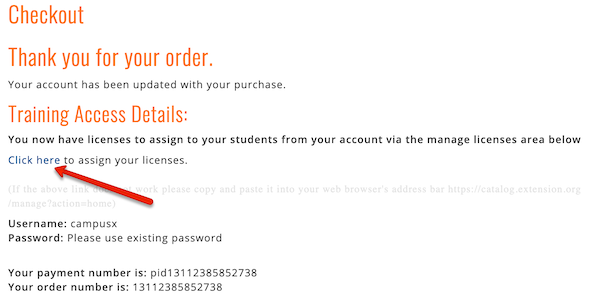
In the checkout screen when purchasing the course, you could have checked a box that said you were purchasing it for someone else, or you purchased multiple seats to the course. If you did, your purchase acknowledgement page (and acknowledgement email) would have looked something like this:
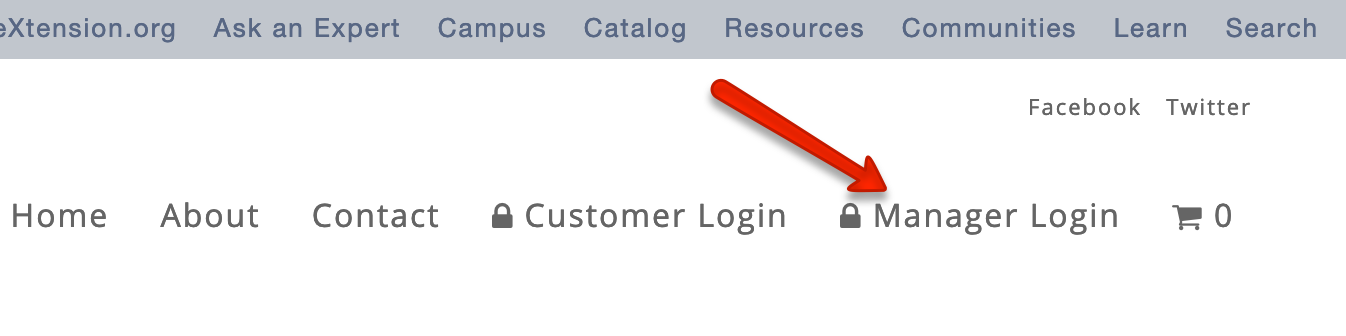
Had you followed that link, you would have landed on a screen to assign the license to someone. If you did not do that, then go to catalog.extension.org and click the “Manager Login” link at the top of the page.
The next screen will guide you to assign the license to the appropriate user by entering the user’s name and email address—even if it is your own name and email address. If you enter your own name and email address, this will immediately enroll you in the course; you can then go to campus.extension.org and access the course. If you really did mean to purchase it for someone else, then that person will receive an email invitation to create an account. As soon as that person creates the account, he/she will be enrolled in the course.