Saltar al contenido principal
Having trouble logging in with Google or Microsoft?

If you're using the Google or Microsoft button to login and receive an invalid password error, please note that we are unable to assist with those login credentials. These accounts are managed by Google and Microsoft, so any issues must be resolved directly through their account recovery tools.

We can only assist with direct logins—this means logging in by entering your username or email and password in the fields above and clicking the "Login" button. If you created an account directly on this site (not using Google or Microsoft), we can help you reset your password via the "Lost password?" link.

Campus Instructors: Campus and Catalog will transition to our new Courses platform on June 30, 2027. Click here to read the full announcement.
Site Logo
Login
En este momento está usando el acceso para invitados (Iniciar sesión (ingresar))
  • Español - México ‎(es_mx)‎
    English ‎(en)‎ English (United States) ‎(en_us)‎ Español - Internacional ‎(es)‎ Español - México ‎(es_mx)‎ Українська ‎(uk)‎ 简体中文 ‎(zh_cn)‎
  1. Inicio
  2. Cursos
  3. CampusHelp
  4. Help With Extension Foundation Campus
  5. Purchasing and Accessing Fee Based Courses

Bloques

Campus Help

Atrás
Pregunta:

I bought a course at catalog.extension.org, but cannot access the course at Campus.

(Última edición: miércoles, 21 de agosto de 2019, 11:18)
Respuesta:

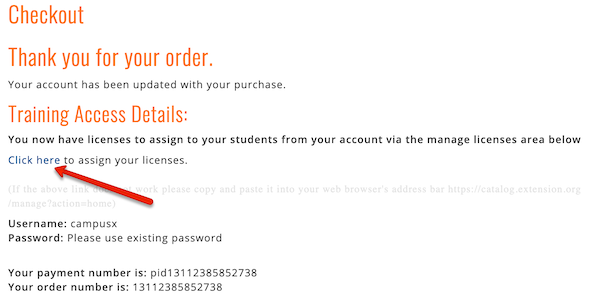
In the checkout screen when purchasing the course, you could have checked a box that said you were purchasing it for someone else, or you purchased multiple seats to the course. If you did, your purchase acknowledgement page (and acknowledgement email) would have looked something like this:

License purchase acknowledgement


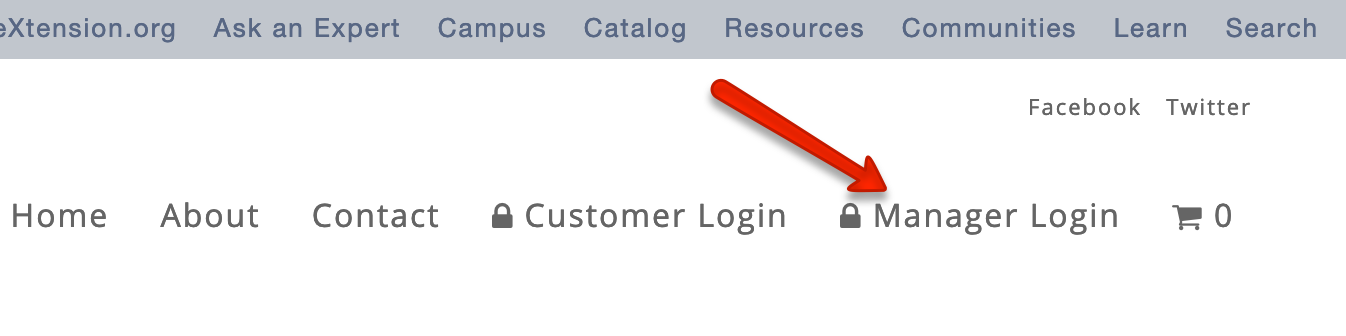
Had you followed that link, you would have landed on a screen to assign the license to someone.  If you did not do that, then go to catalog.extension.org and click the “Manager Login” link at the top of the page. 

Menu bar for catalog.extension.org

The next screen will guide you to assign the license to the appropriate user by entering the user’s name and email address—even if it is your own name and email address. If you enter your own name and email address, this will immediately enroll you in the course; you can then go to campus.extension.org and access the course.  If you really did mean to purchase it for someone else, then that person will receive an email invitation to create an account.  As soon as that person creates the account, he/she will be enrolled in the course.

» Purchasing and Accessing Fee Based Courses

◄ Questions About Course Content, Quizzes, Certificates & Other Activities
Questions by Course Teachers ►

Bloques

Omitir Navegación

Navegación

  • Inicio

    • Páginas del sitio

      • Mis cursos

      • Marcas

      • Búsqueda

      • ForoSite news

    • Mis cursos

    • Cursos

      • CampusHelp

        • Help With Extension Foundation Campus

          • GlosarioQuestions About User Accounts or Login Issues

          • GlosarioHow to Find and Enroll in a Course

          • GlosarioQuestions About Course Content, Quizzes, Certifica...

          • GlosarioPurchasing and Accessing Fee Based Courses

            • Vista Alfabética

            • Vista por Categoría

            • Vista por Fecha

            • Vista por Autor

          • GlosarioQuestions by Course Teachers

Bloques

Bloques

En este momento está usando el acceso para invitados (Iniciar sesión (ingresar))
Políticas
Obtener la App Mobile
  • Español - México ‎(es_mx)‎
    English ‎(en)‎ English (United States) ‎(en_us)‎ Español - Internacional ‎(es)‎ Español - México ‎(es_mx)‎ Українська ‎(uk)‎ 简体中文 ‎(zh_cn)‎
  • Bloques

    Exit hidden sidebar block region.