Having trouble logging in with Google or Microsoft?
If you're using the Google or Microsoft button to log in and receive an invalid password error, please note that we are unable to assist with those login credentials. These accounts are managed by Google and Microsoft, so any issues must be resolved directly through their account recovery tools.
We can only assist with direct logins—this means logging in by entering your username or email and password in the fields above and clicking the "Log in" button. If you created an account directly on this site (not using Google or Microsoft), we can help you reset your password via the "Lost password?" link.
(Останнє редагування: середа 21 серпня 2019 11:44 AM)
Відповідь:
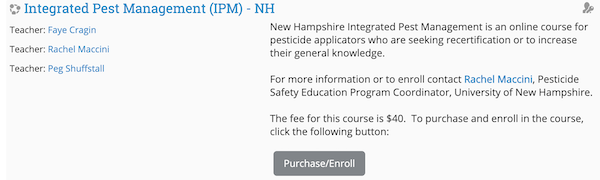
After logging into Campus, locate your course by either browsing through the categories or using the search box. It is not necessary to precisely enter a course name, but just some key words from the course name or a descriptive term. The search will return a list of courses meeting your search, along with the descriptions of each.
If your course is displayed, check first if it is a fee based course. If it is, that will be specified in the course description, and may have a Purchase/Enroll button displayed. If it does, then click on that button to pay for and enroll in that course.
Otherwise, click on the title of the course you wish to take and that action will enroll you in it. In some instances, however, the teacher may require the use of an "enrollment key" before you can proceed. You will know this when you view the course description as it will include a small icon featuring a key on the right margin that looks like this:
An enrollment key is a form of password that is controlled by and issued by the course teacher. The blank for entering that enrollment key will appear on the page after you have clicked on the course title.